
This guide is for third-party applications that want to integrate Cashmere Link into their platform. Cashmere Link provides a seamless way for users to connect their licensed content collections to your application through an intuitive authorization interface powered by OAuth 2.0.
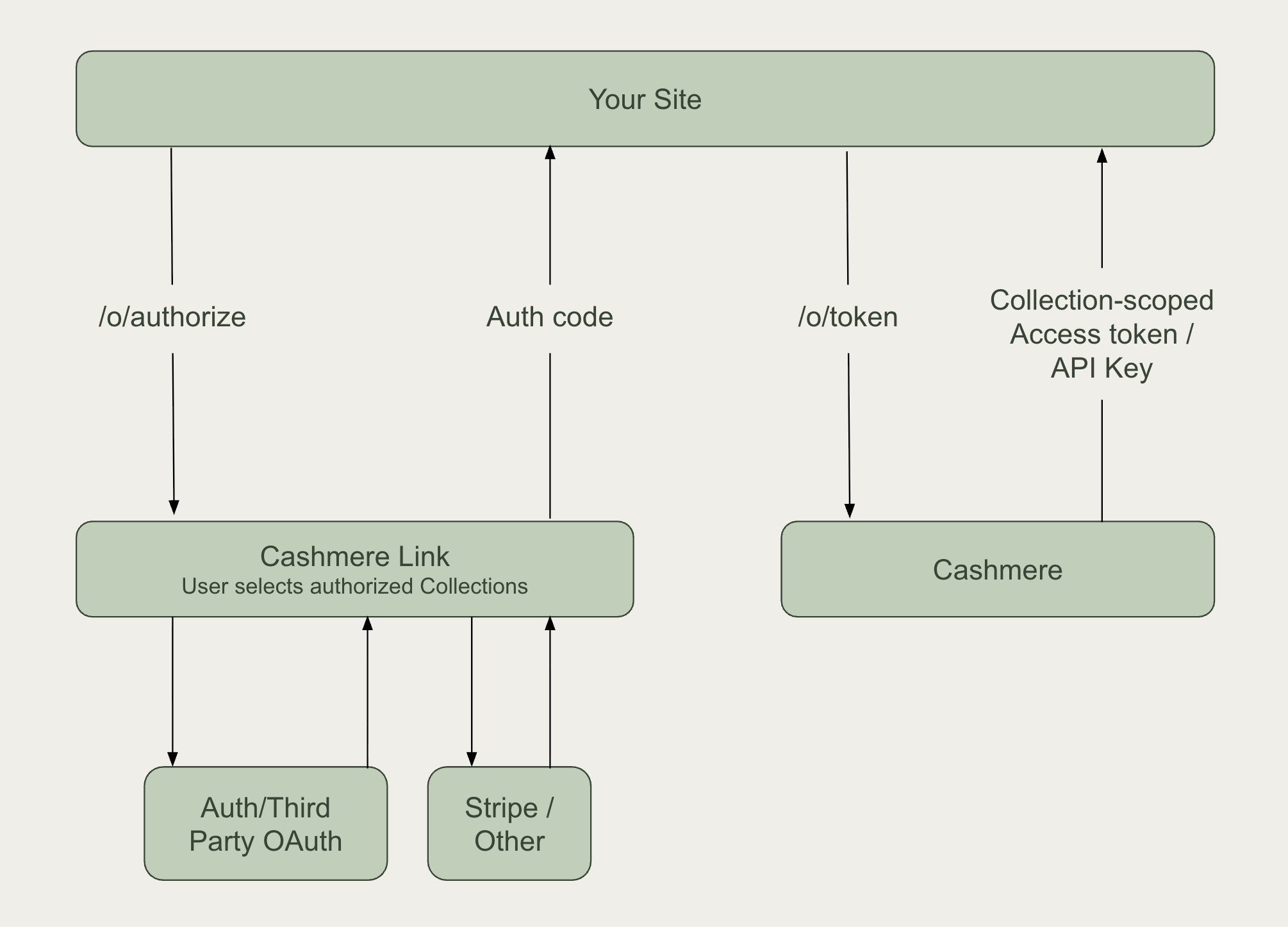
What Cashmere Link Provides
Cashmere Link is not an identity provider — it uses OAuth 2.0 purely as a secure way for users to grant scoped API access to their licensed content. The result of the flow is an API key, not a user profile.
- Secure Authentication: OAuth 2.0 authorization code flow
- Collection Authorization: Users can browse and select from their licensed collections
- Instant API Access: Automatic API key generation for immediate content access
- No User Identity or Profile Data: Cashmere Link does not provide user profile or identity information (e.g., name, email). It’s designed solely for secure, scoped access to Cashmere APIs
Integrating Cashmere Link
To integrate Cashmere Link into your application, you will:
- Register your application with Cashmere
- Implement the OAuth 2.0 flow
- Use the API key provided from the end of the OAuth flow to access Cashmere's content APIs
Step 1: Cashmere Link Application Registration
1.1 Contact Cashmere
To set up Cashmere Link for your application, contact Cashmere with the following information:
Required Information:
- Application Name: Display name shown to users during authorization
- Redirect URIs: List of valid OAuth redirect URIs for your application
- Application Type: Web application, mobile app, or single-page application
- Application Logo: The logo that will be shown to users
You'll Receive:
- Client ID: Public identifier for your application
- Client Secret: Private key for your application (keep secure)
- Authorize Url: https://cashmere.io/o/authorize/
- Access Token Url: https://cashmere.io/o/token/
1.2 Link Application Configuration
You configure your OAuth client with:
- Credentials received from Cashmere (Client ID, Secret, Authorization Url, Access Token Url)
- Grant Type: Authorization Code with PKCE (required)
- Challenge Method: SHA-256
- Redirect URI: Must match one of the Redirect URIs you provided Cashmere
Step 2: Cashmere Link Integration
2.1 Initiating Cashmere Link
Start the Cashmere Link experience by redirecting users to the authorization endpoint, typically after they have clicked a button like "Connect with Cashmere":
GET https://cashmere.io/o/authorize/
Required Parameters:
client_id: Your application's client IDredirect_uri: One of your registered redirect URIscode_challenge: PKCE code challenge (required)code_challenge_method: Must beS256scope: Must be empty orread, we do not support any other scopes and will error if you passopenid email profileetc. Either passreador ensure your client does not pass default scopes that we do not support.
Example Authorization URL:
https://cashmere.io/o/authorize/?client_id=YOUR_CLIENT_ID&redirect_uri=https://yourapp.com/callback&code_challenge=CODE_CHALLENGE&code_challenge_method=S256
2.2 Cashmere Link
When users visit the authorization URL, they'll use Cashmere Link to login to Cashmere and browse and authorize collections.
2.3 Link Authorization Callback
After users complete selection and authorization in Cashmere Link, they're redirected back to your application with an authorization code:
https://yourapp.com/callback?code=AUTHORIZATION_CODE
2.4 Token Exchange
Exchange the authorization code for an access token (API key):
POST <https://cashmere.io/o/token/>
Content-Type: application/x-www-form-urlencoded

grant_type=authorization_code&
code=AUTHORIZATION_CODE&
redirect_uri=https://yourapp.com/callback&
client_id=YOUR_CLIENT_ID&
client_secret=YOUR_CLIENT_SECRET&
code_verifier=CODE_VERIFIER
Successful Response:
{
  "access_token": "your-api-key",
  "token_type": "Bearer",
  "expires_in": 3153600000,
  "refresh_token": "refresh-token",
  "scope": "read write collections:1,2,3,4"
}
The access_token is a Cashmere API key and can be used to access Cashmere's APIs. You should save this key and associate it with your user accounts. API keys do not expire, but we return a high expires_in value as well as a refresh_token to fully meet the OAuth 2.0 specification.
Step 3: Using Your API Key
With a valid API key, you can access the Cashmere API
https://cashmere.io/api/v2/docs
GET https://cashmere.io/api/v2/search
Authorization: Bearer your-api-key
Content-Type: application/json
Step 4: Advanced Cashmere Link Options
4.1 Direct Publisher URL
Link can be configured to go straight to a specific publishers’ collections. Users still have the option to browse to and select collections from other publishers
https://cashmere.io/o/authorize/?linkPublisher={{publisher_id}}
4.2 Skip Collection Selection
An MCP server with Cashmere authentication can grant its own collections instead of asking each user to pick them. Enable Skip collection selection on the server's Content step and select the collections to grant. Users then go from sign-in straight to a connected server.
The option needs Cashmere authentication and at least one collection. It is not available for servers with subscription products, which get their collections per buyer, or for Publisher OAuth, which gets them from the provider token.
Cashmere licenses the collections at authorization time. A collection you own, or one that needs no license, is granted right away. A third party collection stays pending until that publisher approves it, so the user's key does not carry it yet.
4.3 Short Link Mode
Cashmere Link supports a "Short Link" mode for ultra-streamlined experiences. Users authenticate directly with a publisher's OAuth provider, then return to Link with their collections pre-selected based on their publisher account permissions. Publishers must perform extra steps to set this up. Users do not have the option to browse or select collections from other publishers.
This is best for publishers that already have their own login, subscription, or user management system, and they want to synchronize their authorization and entitlement settings with Cashmere.
Additional steps are outlined in the Set Up Publisher OAuth.
After completing the steps initiate the same Link flow as before with your publisher_oauth_provider_uuid included in the authorization url:
https://cashmere.io/o/authorize/{{publisher_oauth_provider_uuid}}